






Grocery shopping does not always have to mean walking through every aisle, waiting in a checkout line, and carrying bags back to the car. Kroger Pickup gives shoppers another option: order groceries online, choose a convenient pickup time, and have the prepared order brought to the vehicle.
For busy families, people managing a long shopping list, or anyone who simply wants to spend less time inside the store, pickup can be a practical alternative to traditional grocery shopping.
The process is fairly straightforward, but there are a few details worth understanding before placing an order. Pickup availability, fees, substitutions, estimated prices, payment, pickup windows, and store procedures can all affect the experience.
This guide explains how Kroger Pickup works, how to place an order, what happens when an item is unavailable, and what to know when you arrive at the store.
BIO
| Label | Information |
|---|---|
| Service | Kroger Pickup |
| Type | Online grocery pickup |
| Provider | Kroger |
| Main Purpose | Convenient grocery collection |
| Ordering Method | Kroger website or app |
| Store Choice | Participating Kroger store |
| Pickup Window | Scheduled one-hour period |
| Order Preparation | Kroger store associates |
| Pickup Location | Designated store pickup area |
| Substitutions | Available based on preferences |
| Pickup Fee | Free on eligible $35+ orders |
| Best For | Faster, easier grocery shopping |
What Is Kroger Pickup?
Kroger Pickup is an online grocery ordering service that allows customers to select groceries through Kroger’s website or mobile app and collect them from a participating store.
Instead of choosing the products yourself inside the store, Kroger associates prepare the order. When you arrive during your selected pickup window, you go to the designated pickup area and an associate brings the groceries to your vehicle.
Kroger says its Pickup service offers access to a large selection of products, with more than 70,000 items available through the service, although the selection can vary by store.
One important point is that not every Kroger store necessarily offers Pickup. Availability depends on the location, so shoppers should select their preferred store and check whether pickup is available before building an order.
How to Place a Kroger Pickup Order
The ordering process starts online and follows a few simple steps. Having your shopping list ready can make the process faster and reduce the chance of forgetting something.
Sign In to Your Account
Start by signing in to your Kroger digital account through the website or mobile app.
Your account helps connect the order with your preferred store, payment information, shopping history, and other available features.
If the system has selected a different shopping method or store, choose the option to change the store and select a location that offers Pickup.
Choose Your Groceries
Once the store is selected, you can begin browsing or searching for products.
You can look through grocery departments or search directly for specific products. This is especially useful when you already know the brands or sizes you want.
Take a moment to check product size, quantity, price, and available options before adding an item to the cart. A quick review can prevent mistakes later.
Review Your Cart
After adding everything you need, open your cart and review the order carefully.
Check quantities, remove products you no longer need, and make sure important items have not been left out.
This is also a good time to review available promotions and digital coupons. Kroger’s terms state that digital coupons linked to the customer’s Loyalty Card can be applied to eligible orders.
Select a Pickup Time
During checkout, Kroger asks you to select an available pickup time slot.
Kroger describes the pickup window as a one-hour period in which you can arrive to collect the order. Its FAQ says pickup times can generally be scheduled up to seven days in advance, although available times and store hours can vary by location.
Choose a time that gives you enough flexibility to reach the store without rushing.
Place the Order
Before completing checkout, review your store, pickup time, items, payment details, and estimated total.
Once everything looks correct, place the order.
Kroger sends electronic communication confirming the order and pickup details. Keeping those notifications available can make it easier to track the order and remember the selected pickup window.
How Kroger Pickup Works After Ordering
After an order is submitted, Kroger associates prepare the groceries for the selected pickup window.
Products such as produce, meat, seafood, and deli items are selected by associates. Kroger says perishable products are selected close to the scheduled pickup time and stored appropriately to help maintain freshness.
If an item becomes unavailable, the order may include a substitution depending on the preferences selected during checkout.
The final order can therefore be slightly different from the original shopping cart. This is one reason it is useful to review the order carefully when you arrive.
Kroger Pickup Substitutions
Substitutions are one of the most important parts of online grocery shopping.
A product that appears available when you place an order may be unavailable when associates actually pick the groceries. Kroger allows customers to indicate whether substitutions are acceptable.
When substitutions are allowed, Kroger’s stated approach is to find an item that is as close as possible to the original selection. Depending on availability, this can include a larger package of the same type, different packaging of the same brand, or another brand of the same type of product.
For products with special dietary requirements, Kroger says substitutions are selected to meet the same dietary requirements, such as gluten-free, sugar-free, lactose-free, or vegan.
If you receive a substitute you do not want, you can tell the pickup associate before the order is completed and loaded into your vehicle.
Kroger also states that unwanted substituted products can be returned to a store for a full refund.
How to Pick Up Your Kroger Order
Once your order is ready, the actual collection process is usually quick.
Arrive During Your Pickup Window
Try to arrive during the one-hour window selected at checkout.
Kroger notes that pickup hours can vary by location, so it is best to follow the hours and instructions provided for your selected store rather than assuming every location follows the same schedule.
If you miss the scheduled date, Kroger says the items may be restocked and you may need to place the order again.
Find the Pickup Area
When you reach the store, follow the signs directing customers to the Pickup area.
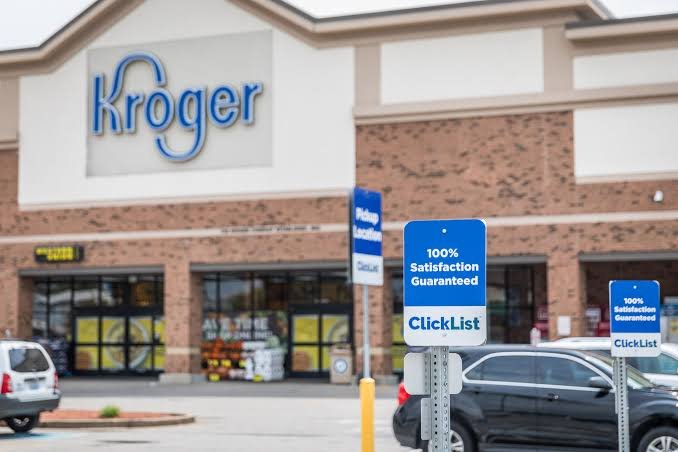
Kroger’s current instructions say customers can park in a designated pickup space and scan the QR code displayed on the sign to notify associates that they have arrived. Customers using the app can also have location services enabled so the store can be notified of their arrival.
Receive Your Groceries
A Kroger associate brings the prepared order to your vehicle.
The associate may review substitutions or unavailable products with you. This is a useful opportunity to ask questions or reject a substitution you do not want.
Once everything is settled, the groceries are loaded into the vehicle and you can leave.
How Much Does Kroger Pickup Cost?
Pickup fees can depend on the size of the order and the applicable store policies.
Kroger’s Pickup FAQ currently states that Pickup is free on orders of $35 or more, while orders below that threshold have a $4.95 service fee, subject to restrictions.
Because fees, promotions, and eligibility rules can change, shoppers should check the fee shown during checkout for their particular order.
It is also worth remembering that the cost of groceries is separate from any applicable service fee. Taxes, product price changes, substitutions, and weighted items can affect the final total.
Kroger Pickup Payment and Final Charges
The amount displayed when you first place an order can be an estimate rather than the final amount.
Kroger explains that the final price can change because of coupons, substitutions, taxes, weighted items, promotions, or price changes.
For example, fresh produce or meat may be sold by weight. The final weight can differ slightly from the amount estimated when the item was added to the cart.
Kroger may also place an authorization hold based on the estimated order total. Its FAQ says such a hold can remain with the bank or financial institution for approximately 3 to 7 business days, depending on the financial institution.
For pickup, shoppers should also bring the payment method used for the order and a backup credit or debit card if requested by the store’s current procedures.
If an order contains age-restricted products, Kroger states that a government-issued ID may be required.
Tips for a Smooth Kroger Pickup
A few simple habits can make the pickup process much easier.
Choose your store carefully. Make sure you are ordering from the location where you actually plan to collect the groceries.
Check the pickup time before submitting the order. A convenient time is more useful than selecting a slot that is difficult to reach.
Review quantities. Online shopping makes it easy to accidentally select several units when you only need one or two.
Pay attention to substitutions. If you strongly prefer a specific brand or size, review the substitution options and preferences available during checkout.
Leave useful instructions for weighted items. Kroger says customers can provide special instructions for products such as produce, including preferences about ripeness.
Keep notifications available. Order updates can help you know when the order is ready and whether there are changes.
Check the order before leaving. Take a moment to look over the bags and review any substitutions while the associate is still assisting you.
Common Kroger Pickup Problems
Even a well-planned order can occasionally have an issue. Most problems are easier to resolve when you understand what to check first.
My Pickup Order Is Delayed
A delay can happen if the store is busy, products are difficult to locate, or the order requires additional preparation.
Check the latest order notification and pickup information before heading to the store. If the order is not ready around the expected time, contact the store or use Kroger’s customer support options.
An Item Is Missing
First, compare the delivered groceries with your order and receipt.
An item may have been unavailable rather than accidentally left out. If something appears to be missing or incorrect, Kroger recommends contacting customer support for assistance with pickup-order issues.
I Received the Wrong Item
Check whether the product is actually a substitution.
If you do not want the substitute, tell the associate before the order is finalized. Kroger’s terms allow customers to reject substitutions at pickup.
If you discover the problem after leaving the store, review Kroger’s return or refund options for the order.
My Preferred Item Was Unavailable
Product availability can change between the time you place an order and the time an associate shops it.
If substitutions are allowed, another suitable product may be provided. If you prefer not to receive alternatives, you can choose the appropriate substitution preference when placing the order.
Kroger Pickup vs. Kroger Delivery
Pickup and delivery both allow shoppers to order groceries without walking through the store, but they work differently.
With Kroger Pickup, you travel to the selected store and collect the order from the designated pickup area. This can be useful when you want to avoid shopping inside but do not mind driving to the store.
With Kroger Delivery, the groceries are brought to your selected delivery location when that service is available.
Pickup can therefore be a good middle ground: you avoid the in-store shopping process while still controlling when you leave the store with your groceries.
The better choice depends on your schedule, location, available services, and the fees shown at checkout.
Is Kroger Pickup Worth Using?
For many shoppers, Kroger Pickup can be a convenient way to make routine grocery shopping more predictable.
The biggest benefit is time savings. Instead of spending time walking through aisles and waiting in a checkout line, you can build the order online and collect it when it is ready.
Another advantage is that online ordering makes it easier to review your cart before purchasing. You can search directly for products instead of moving from aisle to aisle.
There are also some limitations. Product availability is not guaranteed, substitutions can occur, and the final price may differ from the initial estimate. Pickup is also not available at every store.
For shoppers who prefer selecting their own fresh produce or checking products personally, traditional in-store shopping may still be preferable.
Overall, Kroger Pickup is most useful when convenience and time are more important than choosing every product yourself.
Frequently Asked Questions
How does Kroger Pickup work?
You shop for groceries online, choose a participating Kroger store, select a pickup time, and place your order. Store associates prepare the groceries, and you collect them from the designated Pickup area during your scheduled window.
Does Kroger Pickup have a fee?
Kroger’s current FAQ states that Pickup is free for orders of $35 or more, while orders below $35 have a $4.95 service fee, subject to restrictions.
Can someone else pick up my Kroger order?
Yes. Kroger says another person can collect your Pickup order on your behalf. A valid ID may be required for age-restricted products.
What happens if Kroger does not have an item I ordered?
If substitutions are enabled, Kroger associates may select a suitable replacement based on the company’s substitution process. You can also choose not to allow substitutions.
Can I reject a substitution?
Yes. If you are not satisfied with a substitution, you can tell the Pickup associate when the order is being collected. Kroger states that rejected substitutions are removed from the order.
Does the final price always match the online estimate?
Not necessarily. Kroger explains that the final amount can change because of substitutions, weighted products, coupons, taxes, promotions, and price changes.
Final Thoughts
Kroger Pickup is a straightforward option for shoppers who want to spend less time inside the grocery store. The basic process is simple: choose a store, shop online, select a pickup window, review your order, and collect the groceries from the designated area.
The best experience comes from paying attention to the details. Check your pickup time, review quantities, understand substitution preferences, and look over the order when it arrives.
Fees, payment methods, store availability, and other policies can change over time, so the information displayed during checkout should always be treated as the final word for your specific order.
For everyday grocery trips, however, the combination of online ordering and curbside collection can make a routine shopping trip considerably easier and more convenient.